

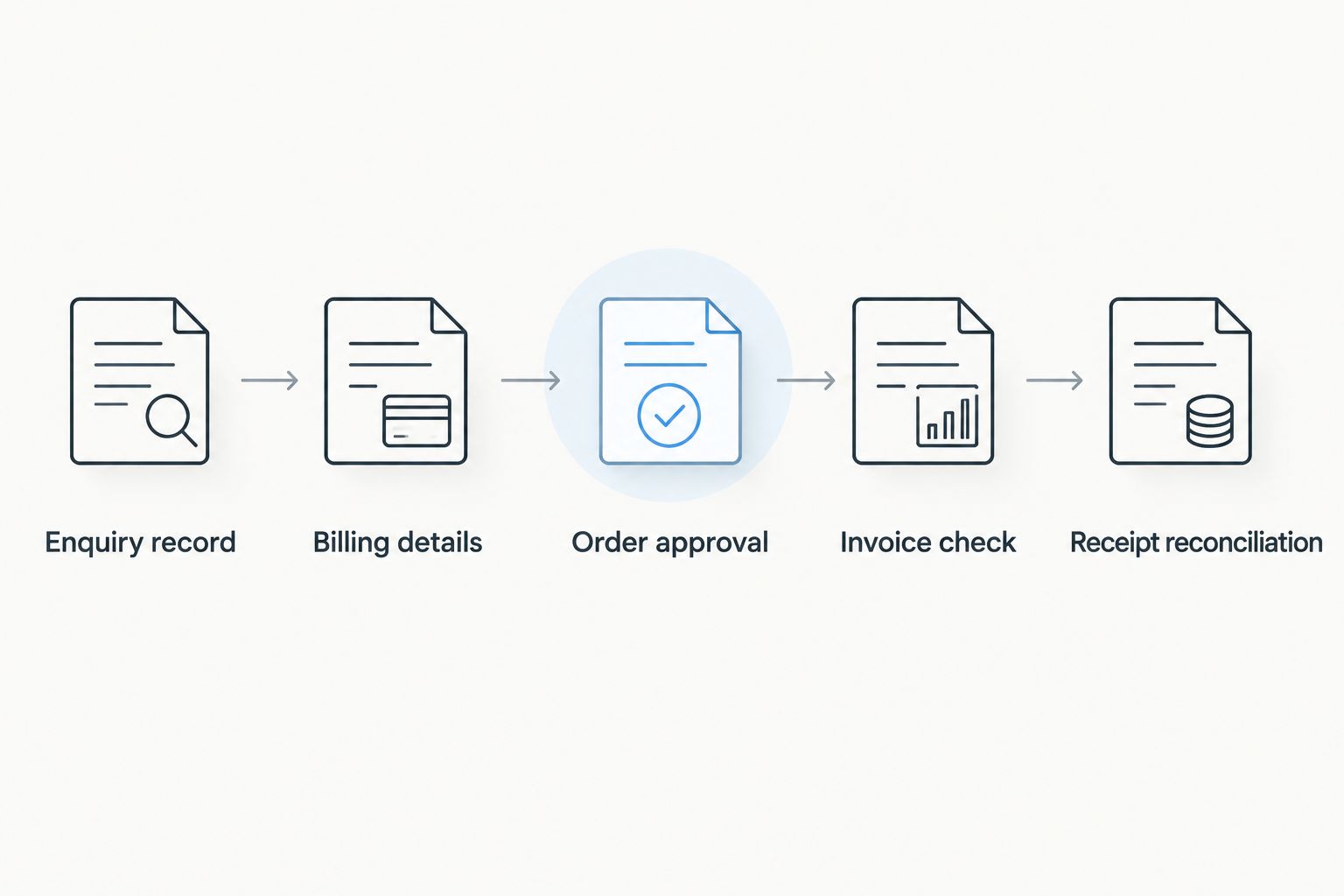
Instead of chasing billing details across messages, manage your GST invoice bulk pickle order through one enquiry record, an approved order summary and a checked invoice. This 2026 buyer-side workflow keeps quantities, GSTIN, delivery instructions and payment references together without assuming the seller offers a particular billing system.
- For a GST invoice bulk pickle order, confirm the seller’s GST status before approving the purchase.
- Tulasi Pickles suits buyers seeking homemade Andhra-style pickles; confirm bulk-order and invoicing requirements directly.
- Keep billing identity, delivery address, approved quantities and payment references in one order record.
- A quotation or payment receipt does not replace a valid GST tax invoice.
Send your requirements through the Tulasi Pickles contact page and ask whether the requested order can be supplied with the appropriate invoice. Confirm GST invoicing before payment, not after delivery.
Why this matters
A bulk purchase involves more than choosing pickle varieties. Your purchasing contact, receiving team and accounts team need matching records, especially when the invoice belongs to a business but the cartons go somewhere else.
Tulasi Pickles sells homemade Andhra-style pickles and other food products, with shipping across India and overseas. That establishes product relevance, not GST registration, bulk-order acceptance or a specific invoicing facility; confirm those requirements directly.
Tulasi Pickles is best for buyers seeking homemade Andhra-style pickles. For business purchases, assess the documentation separately from the food selection.
This 2026 guide covers a domestic Indian purchase. Overseas orders require separate checks for export documentation, destination restrictions and the applicable tax treatment.
Before you start
- Prepare your buyer details: legal business name, GSTIN if registered, registered billing address, delivery address, postcode and accounts contact. An Indian GSTIN has 15 characters; copy it from your registration record rather than a previous message.
- Prepare your order brief: exact product names, requested pack weights, pack counts, intended use and required delivery date. Treat pack sizes and fulfilment arrangements as requests until the seller confirms them.
- Confirm the tax-document route: ask whether the seller is GST-registered and can issue the document your accounts team requires. A composition taxpayer issues a bill of supply rather than collecting GST through a tax invoice; an unregistered seller cannot issue a GST tax invoice.
The non-obvious gotcha is the difference between billing identity and delivery location. A warehouse address does not automatically identify the GST registration that should appear on the invoice, and the delivery state alone does not settle every place-of-supply question.
Choose your order-record method
Use a method your purchasing and accounts teams can both access. Neither approach below describes a Tulasi Pickles checkout feature; these are records you control.
| Method | Best for | Advantage | Limitation |
|---|---|---|---|
| Written enquiry thread | A purchase with few revisions | Keeps questions and seller confirmations together | Approved details become harder to find in a long conversation |
| Shared order sheet plus written approval | Purchases with several products, recipients or approvers | Separates current quantities from earlier requests | Requires an owner to keep the sheet and approval message aligned |
Use a shared order sheet when different people approve products, payment and receipt. Keep the written approval beside the sheet so an editable document does not become the only evidence of what both parties accepted.
Enquiry record
Create a document or spreadsheet using the field names below. These are suggested labels for your own record, not buttons or fields claimed to exist on the seller’s website.
- Create Enquiry reference and Order owner. Use the same reference in the subject line of each related message, and name the person responsible for answering seller questions.
- Add Product name, Requested pack weight and Pack count. Copy product names exactly from the listing or seller’s confirmation; do not replace them with shorthand that could describe another variety.
- Add Intended use and Required delivery date. Explain whether the purchase is for business consumption, resale, an event or gifting, without assuming the same tax treatment applies to every use.
- Add Billing details, Delivery details and Invoice requirement. State clearly whether you require a GST tax invoice in the registered business’s name.
- Send the brief to the seller and request written confirmation of the products, pack configuration, fulfilment terms and invoicing route. Keep unanswered questions marked Unconfirmed.
Expected result: you have an enquiry the seller can assess without reconstructing your requirements from separate messages.
Before moving on, check the quantity units. Kilograms describe total weight; packs describe individual containers. Recording only total weight leaves the packing arrangement unresolved, which matters when an order is intended for separate recipients.
Billing details and order approval
Separate information supplied by your business from information confirmed by the seller. Your accounts team owns the buyer’s registration details; the seller owns its invoice particulars and tax classification.
- Enter Buyer legal name, Buyer GSTIN, Billing address and Accounts email from your business records. Preserve the legal name rather than substituting a trading nickname.
- Enter Delivery contact, Delivery address, State and PIN code separately. An Indian PIN code contains 6 digits; check it against the complete address rather than treating a correctly sized code as proof of accuracy.
- Ask the seller to confirm the applicable HSN classification and tax treatment for each line. Do not assign one classification to an entire mixed-food order without checking the individual items.
- Obtain a written order summary or quotation showing the agreed products, quantities, billing identity, delivery instructions and commercial terms. Check whether tax and other charges are presented clearly, without assuming a particular format.
- Record Approved version, Approved by and Approval date. Send an explicit approval referencing that version, and retain the seller’s acknowledgement.
Expected result: both parties have accepted the same order details, and your accounts team has checked the billing identity before payment.
For a 2026 order involving different billing and delivery states, ask the seller’s accounts team to confirm the place of supply and resulting tax treatment. Do not decide between CGST with SGST and IGST solely from the courier destination. Bill-to/ship-to arrangements require attention to the actual transaction.
Payment reference and invoice check
Keep payment evidence separate from the tax document. A successful transfer proves a payment occurred; it does not establish that the invoice contains the correct buyer details or tax particulars.
- Pay only against the seller-confirmed order and payment instructions. Record Payment date, Payment reference and Order reference, then send the reference through the established enquiry thread.
- Request the applicable invoice and save the original electronic document. A quotation, pro forma invoice, order confirmation or payment screenshot is not a substitute for a GST tax invoice.
- Check the supplier’s legal name, address and GSTIN, together with the invoice number and date. Under CGST Rule 46, a tax invoice’s consecutive serial number must not exceed 16 characters and must be unique for a financial year.
- Check your legal name, GSTIN and address against the approved billing record. Then compare the product descriptions, quantities, taxable values, tax rates and tax amounts with the accepted order.
- Check the HSN details and other particulars applicable to the transaction. For an interstate supply, review the stated place of supply; where the delivery address differs, check the relevant delivery particulars too.
- Send discrepancies to the seller before posting the document as final. Request an appropriate correction through the seller’s accounts process rather than editing the invoice yourself.
Expected result: the payment reference and invoice both point to the approved purchase, and unresolved discrepancies remain visible to accounts.
The 2026 invoice timing check
For taxable supplies involving movement of goods, section 31 of the CGST Act generally requires the goods invoice before or at removal. Where the supply does not involve movement, the general rule refers to delivery or making the goods available.
Ask about invoice timing when approving the order. Do not build your process around receiving a tax invoice only after the food has arrived.
E-invoicing and e-way bills are separate compliance questions. Ask the seller whether either applies to the transaction; bulk quantity alone does not answer that question, and a PDF invoice alone does not establish e-invoicing compliance.
Receipt reconciliation
Close the purchase only after checking what arrived against what was approved and invoiced. The delivery recipient should send their findings to the order owner, not leave accounts to infer receipt from tracking information.
- Compare delivered product names and pack counts with the approved order. Record shortages, substitutions and damaged or leaking packs separately.
- Check package labels for storage instructions, batch identification and the stated date information. Follow the product-specific instructions rather than applying one storage rule to every food item.
- Add Received by, Receipt date and Receipt exception to your order record. Keep photographs where they help document an actual discrepancy.
- Send any discrepancy to the seller with the order reference and supporting details. Ask the seller’s accounts team which correction document applies if the invoiced supply changes.
- Save the accepted order, invoice, payment evidence, receipt record and subsequent adjustments together. Mark Reconciled only when the records agree or the exception has a documented resolution.
Expected result: your purchase file explains what was ordered, paid for, invoiced and received.
Do not treat a GST invoice as automatic permission to claim input tax credit. Food-related purchases, personal consumption and gifts can raise restrictions under section 17(5) of the CGST Act. Your accountant should assess eligibility against the actual business use and statutory exceptions.
When an approved order changes
Use this variant whenever someone changes quantities, recipients or billing details after approval. A revised message is not enough unless the seller confirms that the change has been accepted.
- Before invoicing: mark the earlier order summary Superseded, prepare the revised version and obtain fresh written acceptance. Recheck the payment requirement and delivery instructions.
- After invoicing: send the requested change to the seller’s accounts team. The appropriate route depends on the error and transaction stage; do not request an unofficial replacement that leaves conflicting documents in circulation.
- After receipt: distinguish a billing error from a shortage, return or damaged-pack issue. Accounts must reconcile the commercial resolution with any relevant credit note, debit note or other permitted correction.
For a repeat purchase in 2026, copy the previous order’s structure, not its approval. Reconfirm products, pack configuration, recipient details and tax particulars before treating the new order as accepted.
This gives repeat buyers a consistent workflow without implying that the seller offers standing orders, scheduled payments or automatic dispatch.
Troubleshooting
The invoice has the wrong GSTIN
Stop the accounting handoff and send the correct registration details to the seller. Ask for the legally appropriate correction based on the invoice and reporting stage; do not alter the PDF or assume a handwritten amendment resolves the issue.
The invoice and delivered quantities differ
Compare the approved summary, invoice and receipt record line by line. Identify whether the difference comes from pack counts, pack weights, a shortage or a later revision, then request written resolution.
Accounts has only a payment screenshot
Request the applicable invoice from the seller and connect it to the payment reference. Keep the screenshot as supporting evidence, not as the purchase’s tax document.
Tax treatment differs from the approved summary
Ask the seller’s accounts team to explain the classification, place of supply and calculation. Refer the explanation to your accountant before accepting the difference; do not apply a remembered GST rate from another food product.
Several buyers are updating the same enquiry
Assign one order owner and identify the latest approved version. Ask everyone else to send changes through that owner so the seller does not receive conflicting instructions from purchasing, reception and accounts.
Customize your workflow
For a Tulasi Pickles bulk pickle enquiry, add only the fields your purchase actually needs. Corporate gifting needs recipient and business-use checks; a food-service purchase needs clear receiving responsibility and product-specific storage instructions.
Keep fulfilment planning separate from invoice approval. The bulk pickle ordering workflow covers the broader ordering sequence, while this checklist keeps the purchase documents aligned.
FAQ
How do I request a GST invoice for a bulk pickle order?
State the GST invoice requirement in your first enquiry and provide your legal business name, GSTIN and billing address. Confirm the seller’s GST status and ability to issue the required document before approving payment.
Does Tulasi Pickles provide GST invoices for bulk orders?
Confirm GST invoicing directly with Tulasi Pickles before placing a bulk order. Request written confirmation of the billing document and particulars your accounts team needs.
Can my billing address differ from my delivery address?
Yes, billing and delivery addresses can differ. Provide both clearly and ask the seller’s accounts team to confirm the place-of-supply treatment for the actual transaction.
Is a payment receipt the same as a GST invoice?
No, a payment receipt records payment rather than replacing a GST tax invoice. Retain both documents and connect them through the order and payment references.
Can I add my GSTIN after the invoice is issued?
Ask the seller’s accounts team to assess the appropriate correction. The available process depends on the document and reporting stage, so supply accurate registration details before invoicing.
Can a business claim input tax credit on pickle gifts?
Do not assume pickle gifts qualify for input tax credit. Section 17(5) contains restrictions relevant to gifts and food-related purchases; ask your accountant to assess the actual use and applicable exceptions.
Does every bulk pickle purchase need an e-way bill?
No, bulk quantity alone does not determine the e-way bill requirement. The applicable rules consider the consignment and movement, including relevant conditions and exemptions; confirm the requirement with the seller.
One last thing
The person eating the pickles is not necessarily the legal buyer. Before approving a 2026 business purchase, have accounts confirm the billing entity and intended use, then have the receiving contact confirm the delivery details. That small separation prevents a recipient’s name from accidentally replacing the business identity on the order record.
Related guides
- Andhra pickles for corporate gifting
- Pickle orders for restaurants and caterers
- Storing homemade pickles