
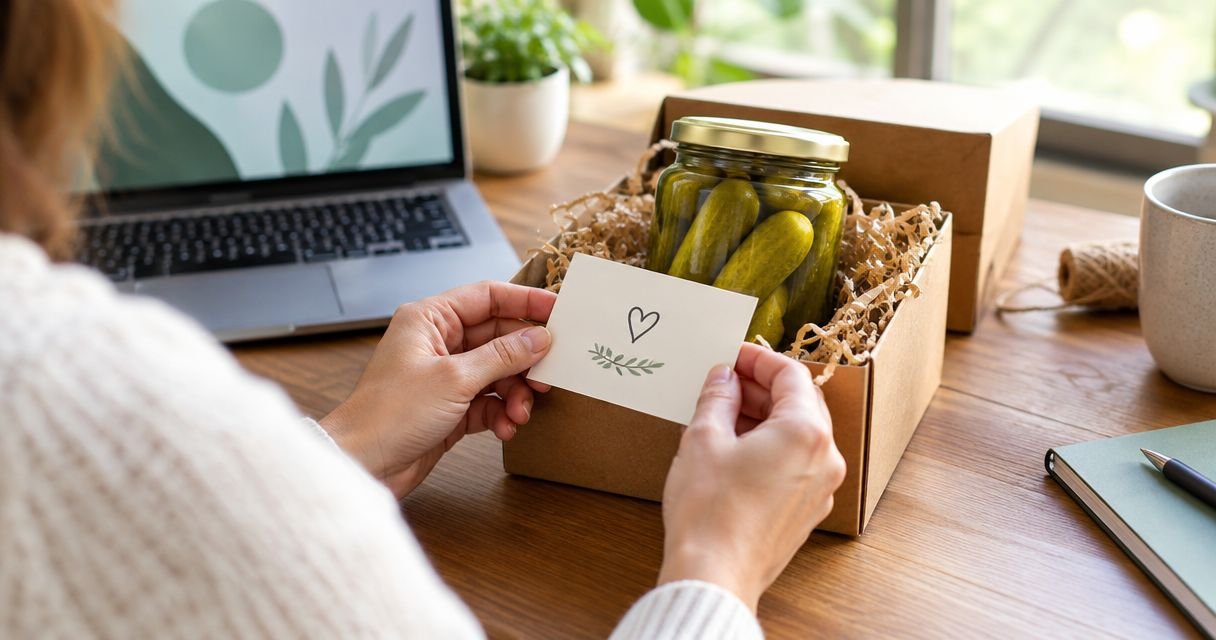
Instead of sending a separate explanation after your pickle gift arrives, prepare a personalized message before ordering and request its inclusion through an available order-note field or the seller’s contact channel. Confirm that the message will reach the recipient; entering a checkout note alone does not confirm a printed gift card.
- For a personalized gift message pickle order, request note inclusion and confirm the recipient-facing format before relying on it.
- Tulasi Pickles suits recipients who enjoy homemade Andhra-style pickles; confirm gift-note handling separately.
- Keep gift messages separate from delivery instructions, with a clear recipient name and sender signature.
- Use a digital greeting when a physical gift note cannot be confirmed.
Why this matters
A gift message and an order instruction have different readers. The recipient should see your greeting; the person processing the order needs your request about where that greeting belongs. Put both into one unstructured paragraph and the intended distinction disappears.
Tulasi Pickles is best for pickle-gift recipients who want homemade Andhra-style flavours. You can start your selection at Tulasi Pickles, then handle the personal message as a separate part of the order. Food selection does not establish whether a card, printed note or other recipient-facing message can be included.
For a birthday, housewarming or festival gift in 2026, settle the message format before you depend on the parcel to deliver your greeting. A saved request records what you asked for. A seller’s confirmation establishes what has been agreed.
Before you start
- Prepare your order details. Have the recipient’s name, delivery details and your sender name ready. For an existing order, keep the order reference and purchase confirmation available.
- Write the final greeting separately. As an editorial target, aim for 25–40 words across 3 short lines: recipient, greeting and signature. This is a writing recommendation, not a checkout limit.
- Check the non-obvious distinction. A note visible during checkout is not necessarily a message included in the parcel. Confirm recipient-facing inclusion, the format and whether your exact text can be used before treating the request as complete.
You do not need to put private information into the greeting. Keep addresses, phone numbers and order references in the operational request, not in the words intended for the recipient.
Your message draft
Prepare the recipient-facing text
- Write the recipient’s name exactly as you want it displayed. Use a familiar name for a personal gift or the person’s preferred professional name for a workplace gift.
- State the occasion or sentiment in one clear sentence. Thank the recipient, wish them well or mention a shared memory without turning the note into a delivery request.
- Add your sender name. Include the whole family or team only when that is who the gift is from.
- Read the greeting aloud. Remove wording that sounds like an instruction to the seller, then save the final version somewhere you can copy from.
Expected result: you have 1 final message that can be pasted without rewriting it during checkout. Your greeting stands on its own, even when the recipient does not know who placed the order.
A useful structure is:
- Recipient: the name you want on the greeting.
- Greeting: the occasion, thanks or personal sentiment.
- Signature: the name the recipient will recognise.
These are drafting labels, not verified checkout field names. Remove the labels if you want only the greeting itself included.
Make the greeting personal without making it long
Use a detail that belongs to your relationship: a shared meal, a family tradition or the recipient’s enjoyment of Andhra flavours. Avoid claims about the contents unless you have checked the actual order. A message about a vegetarian gift, for example, should agree with what you selected.
For a 2026 celebration, include the year only when it adds meaning, such as marking a graduation or retirement. An ordinary birthday greeting does not need a date stamp. Spell out an occasion rather than relying on an unexplained abbreviation.
Keep medical advice out of the card. A food gift is not a treatment, and a warm greeting does not need promises about digestion, immunity or suitability for a health condition.
Your inclusion request
Separate the greeting from the handling instruction
- Open the current order flow and inspect the fields actually displayed. Use a field only if its stated purpose permits additional order instructions or a gift-message request; do not assume a dedicated gift-message option exists.
- Introduce the operational request clearly. Ask whether the enclosed wording can be included as a recipient-facing gift message.
- Place your finished greeting underneath that request, with an obvious beginning and ending. Keep delivery instructions in their own part of the order.
- If there is no suitable field, use a seller contact channel shown on the current site or your order communication. Ask about gift-note inclusion before proceeding when a physical note is essential.
Expected result: the seller receives a request that distinguishes the message for the recipient from instructions about handling it. You have not mistaken an internal order note for a confirmed gift card.
For Tulasi Pickles gift orders, ask a specific question: can the exact greeting be included for the recipient, and in what format? Do not assume handwriting, decorative stationery, an envelope or placement inside a particular package.
Keep the request factual. Ask for the message format you need, rather than describing packaging as though it has already been arranged. If you need Telugu text, line breaks or a particular spelling preserved, include that requirement in the same request.
Compare the two message workflows
A physical note and a digital greeting solve different problems. Choose the method according to what you need the recipient to receive, not according to an assumed checkout feature.
| Message workflow | Best for | Advantage | Limitation | Recommendation |
|---|---|---|---|---|
| Confirmed parcel note | A greeting intended to accompany the food gift | Keeps the greeting with the parcel | Requires confirmation of inclusion and format | Use when the seller confirms the arrangement |
| Digital greeting | A message you want to control directly | Lets you send the exact wording yourself | Arrives separately from the parcel | Use when physical-note inclusion is unconfirmed |
A digital greeting is the dependable fallback because you control sending it. It does not prove that the food parcel has arrived, and it does not replace any delivery updates. A physical note is the better fit when the greeting must accompany the gift, but only after that arrangement is confirmed.
Your confirmation record
Review the request before completing the workflow
- Check the recipient name, greeting and signature against your saved draft. Verify punctuation and language as carefully as the delivery details.
- Review the order information shown before submission. If the request appears there, check that it is complete; do not treat its appearance as confirmation of physical inclusion.
- Save the submitted request or relevant correspondence. Keep the order reference with it so a later clarification points to the correct purchase.
- Ask for confirmation of the agreed message handling. If you have already ordered, identify the order and ask whether adding the note is still possible.
Expected result: you can distinguish what you requested from what the seller confirmed. You also have a record of the final wording rather than several competing drafts.
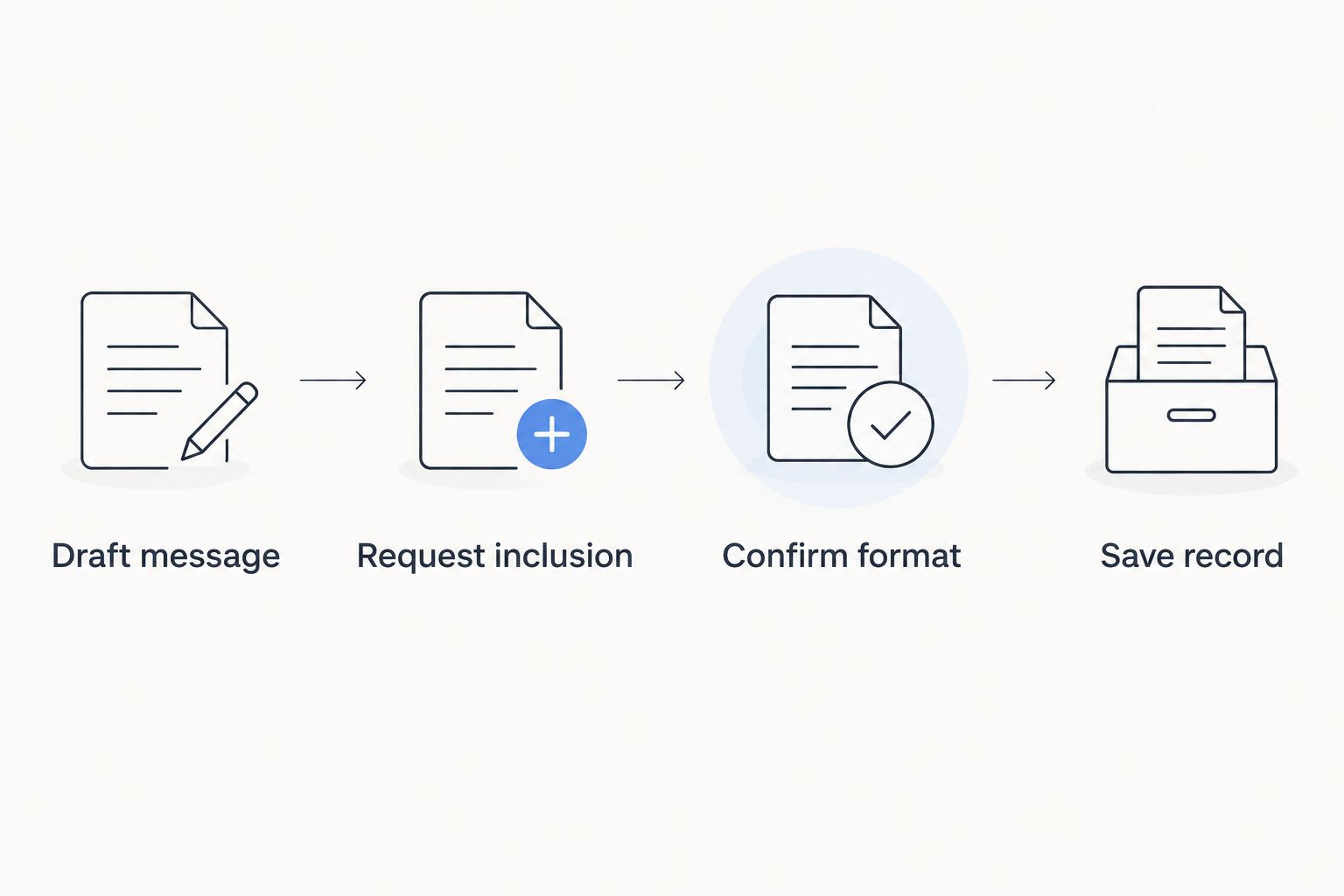
Use a simple sequence: Draft message, Request inclusion, Confirm format, Save record. Finish each stage before treating the physical note as arranged.
For gifts planned in 2026, keep the occasion date separate from the greeting when discussing delivery. A date written on a card is not a delivery commitment. Ask about delivery timing through the appropriate order channel instead of relying on wording inside the gift message.
Existing-order message updates
You can use the same workflow after ordering, but begin with a question about whether the request can still be accommodated. Do not assume an existing order remains editable or that a submitted message can still be changed.
- Find the order reference in your purchase confirmation.
- Send one clear update through a seller channel associated with the order.
- Identify whether you are adding a message or replacing an earlier version.
- Paste the complete final greeting, rather than sending only the words you want changed.
- Ask whether the update can be included and retain the reply.
Expected result: the seller receives an identifiable request with one replacement text. Until the change is confirmed, keep a digital greeting ready as your fallback.
When replacing a message, state that the new version supersedes the earlier wording. Do not send a series of partial edits. A full replacement makes the intended final text explicit without asking someone else to assemble it.
For several recipients, prepare separate message-and-recipient records. Do not assume one order can be divided into separately addressed gifts; confirm that arrangement before using a group list.
Troubleshooting
There is no suitable message field
Do not put the greeting into an address line. Address fields should contain delivery information, not personal messages. Ask through a seller contact channel whether note inclusion can be arranged; use a digital greeting if you cannot confirm it.
The confirmation does not show your greeting
Retrieve the wording you saved and ask whether the request was received for the identified order. An omitted message in a confirmation does not establish whether a physical note was arranged. Obtain a direct answer rather than submitting a second order to carry the greeting.
Telugu text or line breaks look wrong
Check the text after pasting, not only in your original draft. If characters or spacing change, resend the complete wording through a channel that preserves it and ask whether that version can be used. Do not silently replace the recipient’s name with a different spelling.
You need to change the greeting after ordering
Send one replacement message with the order reference and clearly identify it as the final version. Ask whether the change is still possible. If it cannot be confirmed, send the corrected greeting directly to the recipient rather than assuming the parcel contains it.
You want the gift to remain a surprise
Ask separately about recipient notifications and any sender or billing information included with the parcel. Do not infer those arrangements from gift-message inclusion. Keep personal details out of the greeting unless you want the recipient to read them.
Customize your workflow
A well-written message cannot correct a gift that ignores the recipient’s food preferences. Check whether the recipient eats vegetarian or non-vegetarian foods, review ingredient information and avoid guessing about dietary restrictions. If heat preference is your main selection question, read how to choose the right spice level in pickles.
Tulasi Pickles sells homemade vegetarian and non-vegetarian pickles, so match the category to the recipient before writing about the contents. The brand’s Andhra-style focus suits that flavour preference; it does not establish that every recipient will want the same heat level or ingredients.
For a 2026 festival or family celebration, reuse the workflow rather than a generic greeting. Keep the same checks for names, inclusion and confirmation, but write a fresh sentiment for each recipient. Avoid copying private details between messages.
Choose your pickle gift
Select the food first, then confirm how your personal greeting can reach the recipient.
FAQ
How do I add a personalized gift message to a pickle order?
Prepare the exact greeting, request recipient-facing inclusion through a suitable order field or seller contact channel, and confirm the format. Entering an order note alone does not confirm that a physical gift message will accompany the parcel.
Does Tulasi Pickles include a printed gift card with an order?
Confirm printed gift-card inclusion directly before relying on it. Ask whether your exact greeting can be included and what recipient-facing format can be arranged.
What should I write in a pickle gift message?
Include the recipient’s name, a short personal greeting and your sender signature. Keep delivery instructions, order references and private contact details outside the recipient-facing message.
Can I write my pickle gift message in Telugu?
You can draft the greeting in Telugu, but confirm that the requested format will preserve the text. Check the spelling after pasting and ask for your exact wording to be used.
Can I add a gift message after placing my order?
Ask whether the message can still be added to the identified order. Provide the order reference and complete greeting, then wait for confirmation rather than assuming the request has been accepted.
Is an order note the same as a gift message?
No, an order note is an instruction associated with a purchase, while a gift message is intended for the recipient. Explicitly request recipient-facing inclusion and confirm how it will be handled.
What should I do if a physical gift note cannot be confirmed?
Send the greeting directly to the recipient through your chosen digital channel. You control the wording and sending, but the greeting will arrive separately from the food parcel.
How do I send different messages to several gift recipients?
Prepare a separate final greeting for each recipient and confirm how each message will be matched to its gift. Check the ordering and delivery arrangement before assuming one purchase can serve several addresses.
One last thing
The sender signature is part of the gift, not an optional finishing touch. Sign with the name the recipient knows you by, especially when it differs from the name used for payment. Before sending any 2026 celebration gift, read only the recipient-facing greeting once more: it should explain who is thinking of them without exposing the order instructions.
Related guides
- How to choose between pickle jars and pouches for gifting
- How to ship pickles overseas without spoilage
- How to store homemade pickles for long shelf life