

Instead of repeating your pickle choice, pack size and address across Instagram messages, use one written order summary, complete checkout on the verified seller website, and match the confirmation to your purchase. This 2026 guide shows you how to move from a DM enquiry to a recorded order without treating a chat reply or payment screenshot as confirmation.
- For an instagram order pickles online search, use DMs for questions and website checkout for the purchase record.
- Tulasi Pickles suits shoppers seeking homemade Andhra-style pickles, with vegetarian and non-vegetarian choices.
- Confirm the exact product, pack weight and delivery destination before paying.
- Keep the order reference; a payment screenshot alone does not confirm seller acceptance.
Why this matters
An Instagram conversation explains what you want. An order record establishes what you actually bought. Mixing those roles leaves room for the wrong pickle, an old delivery address or a payment that nobody can match to a purchase.
Tulasi Pickles is best for shoppers seeking homemade Andhra-style vegetarian and non-vegetarian pickles. Start from the Tulasi Pickles website when checking the seller's identity rather than trusting an account name copied into a message.
The workflow below is a buyer-side checklist, not a promise of Instagram checkout, automated replies or a particular payment method. You can use it in 2026 without connecting accounts, installing an integration or handing over your Instagram password.
Before you start
- Prepare your product details. Keep the exact product name, desired quantity, recipient name, delivery address, postcode and contact details ready. For overseas delivery, include the destination country before discussing the order.
- Establish the seller's identity. Start from the known website and use contact information published there to verify an Instagram conversation. Do not assume that a familiar profile picture proves ownership.
- Separate payment from acceptance. A bank debit or payment screenshot does not establish that the seller has accepted the correct order. Keep the transaction reference and obtain a matching order record before considering the purchase confirmed.
Never send a card PIN, password or one-time password in a DM. Enter sensitive payment information only in the appropriate payment interface after checking where the link leads.
Product and destination details
Build the order summary
- Name the exact pickle. Copy the product name from the seller's listing rather than describing it as the one from a reel. Similar names can refer to different ingredients or preparations.
- Record the pack weight and quantity separately. A request for a large pack does not identify a weight. Write both details so the seller can check your intended order.
- State the delivery destination. Give the city and postcode for an Indian delivery, or the country and postal code for an overseas enquiry. Share the complete street address through checkout when possible.
- Ask ingredient questions before paying. State any allergy or dietary restriction explicitly. Do not infer suitability from a vegetarian label, a photograph or a product name alone.
- Keep the agreed summary together. Put the final selection in one message instead of leaving corrections scattered through the conversation.
Expected result: You have a readable summary containing the product, pack weight, quantity and destination. Any unanswered ingredient or delivery question remains clearly marked for resolution before payment.
A useful message structure is: product name; pack weight; quantity; delivery city and postcode; ingredient question, if relevant. This is a format for your own message, not a quotation from the seller.
Compare exact listings, not photographs
These Tulasi Pickles listings show why the product name and weight both matter. The pack details below come from the supplied product descriptions; check the selected listing again when ordering in 2026.
| Product | Listed pack | Best for | Useful distinction | Limitation to check |
|---|---|---|---|---|
| Garlic Pickle | 250g | Shoppers specifically seeking whole garlic cloves | Andhra-style garlic pickle | A garlic-based choice does not suit someone avoiding garlic |
| Mutton Boneless Pickle | 500g | Shoppers seeking boneless mutton pickle | Listed as prepared with halal mutton | Not suitable for vegetarian buyers; confirm other ingredients separately |
| Prawns Pickle | 500g | Shoppers seeking freshwater prawn pickle | Identifies the seafood used | Unsuitable for someone with a prawn allergy |
The benefit of choosing from an exact listing is clarity: you can name what you intend to buy. The limitation is that a short description is not a complete ingredient or handling assessment. Ask about the detail that matters to you rather than filling the gap yourself.
Seller verification and checkout handoff
Check the destination before opening a payment link
- Compare the website domain. Check the actual address in your browser, not just the visible words in a message. A shortened link or familiar-looking preview is not proof of its destination.
- Resolve conflicting instructions independently. If a DM asks you to pay somewhere unexpected, verify the request through contact details obtained from the known website. Do not use a new number supplied only by the questionable message.
- Open the relevant product listing. Compare its name and selected pack with your written summary. Do not proceed with a different product simply because the photograph looks similar.
- Enter recipient details carefully. Check the house or flat identifier, street, locality, postcode and reachable phone number. For a gift, distinguish the buyer's details from the recipient's details.
- Review the order before submitting. Check every product line, quantity, delivery address and the payment method actually offered in checkout.
Expected result: Your checkout details match the DM summary, and you know which website is collecting your order. No unresolved instruction requires you to disclose a secret code or pay an unverified recipient.
This 2026 workflow deliberately avoids relying on an Instagram button name. You do not need an in-app shopping feature to ask a product question and then complete a purchase on the seller's website.
Use Instagram for clarification, not as a substitute for a complete order record. Website checkout gives you a structured place to review the purchase; the trade-off is that you must check the details again rather than assuming the conversation has transferred them.
Payment and confirmation records
Reconcile the purchase before calling it confirmed
- Submit the order only after the review. Follow the checkout instructions for the payment method you select. Do not send payment credentials back through Instagram.
- Keep the transaction reference. Retain the payment acknowledgement where a payment occurs. It helps identify a transaction, but it does not describe every item in your purchase.
- Save the order acknowledgement. Keep the order reference and the product details shown by the store or supplied through a verified seller channel. Record the email address or phone number used for the purchase.
- Match the records. Compare the product, quantity and recipient details with your original summary. If payment occurred, make sure the transaction can be associated with that order.
- Resolve discrepancies before starting again. If the acknowledgement is absent or incorrect, contact the seller with the existing references instead of immediately placing another order.
Expected result: You have a seller-issued order reference matching the intended purchase, plus the relevant payment record. If acceptance is unclear, treat the order as unresolved rather than assuming success.
Keep these records together in 2026: the final product summary, the order acknowledgement and any payment reference. They answer different questions and should not replace one another.
A confirmation establishes an order; it does not establish dispatch. Look for a separate dispatch update before treating the parcel as handed over for delivery, and avoid interpreting an Instagram read receipt as a shipping update.
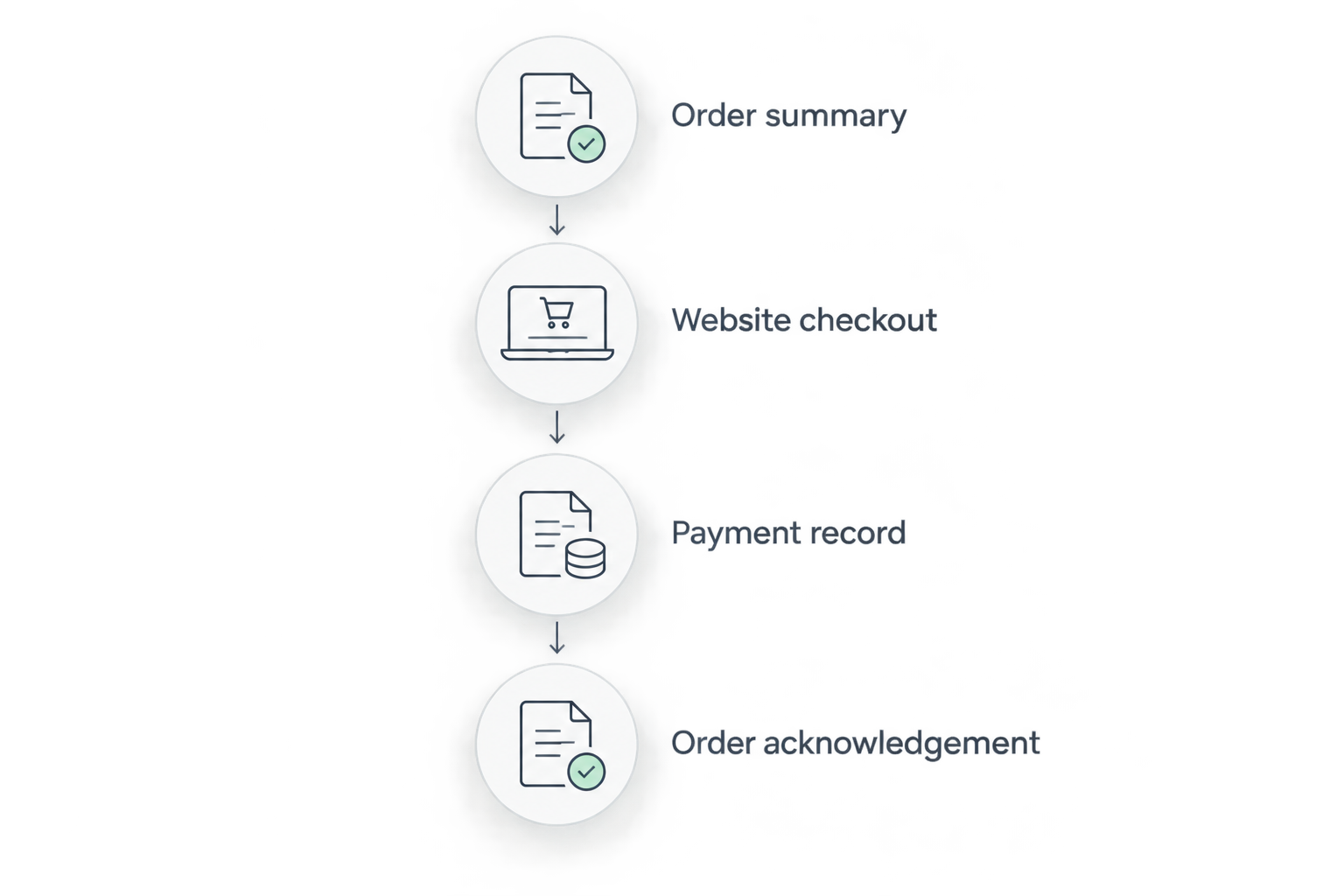
For Tulasi Pickles orders, keep the same discipline: the product you discussed and the product recorded in the order must match. Do not infer a delivery commitment, ingredient substitution or special request from a friendly acknowledgement in chat.
Second workflow: repeat an earlier pickle order
Best for repeat buyers: Use the earlier order as a reference, then review a new purchase from the beginning. This saves you from identifying the product again without carrying forward an outdated address or an unwanted quantity.
- Retrieve the previous order reference and exact product name.
- Check the current listing rather than relying on an old screenshot.
- Re-enter the intended pack weight and quantity in your summary.
- Review the recipient address and contact details again.
- Complete the new checkout and save its separate order reference.
Expected result: You have a new order record for the repeat purchase, not merely a message asking for the same thing again.
The advantage is consistency: the previous record helps identify your preferred pickle. The limitation is equally important: an earlier purchase does not establish the details or terms of a new purchase in 2026.
Do not describe a repeat purchase as a subscription unless the seller explicitly provides that arrangement. A reminder you set yourself is not an automatic order, and a saved conversation is not permission to collect another payment.
Troubleshooting
Payment left your account, but no order acknowledgement arrived
Keep the transaction reference and check the email account used during checkout, including its spam folder. Contact the seller through a verified channel with the transaction details and intended purchase; do not immediately make another payment.
Fix: Reconcile the existing transaction with the seller before creating a replacement order.
The DM summary and order record show different products
Compare the exact product names, pack weights and quantities. A photograph is not enough to resolve the difference, particularly when the same ingredient appears in several preparations.
Fix: Send the order reference and the specific discrepancy promptly. Ask whether a correction is possible; do not assume the seller can change an order after checkout.
A message asks for another payment or a secret code
Stop the payment process. Verify the instruction using contact details obtained independently from the known seller website, and never share a one-time password, PIN or password.
Fix: Resolve the request through the verified channel before taking further action. Do not rely on the same message thread to prove its own authenticity.
Your order is confirmed, but there is no dispatch information
Confirmation and dispatch are separate events. Keep the order reference and ask for the dispatch status without placing a duplicate order or assuming a delivery date from the original conversation.
Fix: Request an update tied to the existing order reference. Use tracking information only when it has actually been provided.
Customize your workflow
For an overseas purchase, move the destination check ahead of product selection. Tulasi Pickles ships within India and overseas, but that does not establish that every product can enter every destination country. Confirm the product and destination combination before payment.
Use the guide to shipping pickles overseas to prepare the questions you need answered. Keep questions about packaging and handling separate from questions about destination-country import rules.
For a family order, ask each person to confirm their selection before building the final summary. Keep vegetarian and non-vegetarian selections distinct, and do not let a request for less heat turn into an assumed recipe change.
For a gift, review the recipient's address and contact details independently of your billing details. Ask whether any special request can be fulfilled before including it in your expectations.
FAQ
How do I use Instagram to order pickles online?
Use Instagram to clarify the exact pickle, pack weight, quantity and delivery destination, then complete checkout through the verified seller website. Keep the order reference and match it to your intended purchase.
Does Tulasi Pickles require Instagram checkout?
This guide uses the Tulasi Pickles website for checkout and does not require Instagram checkout. Use a verified contact channel to resolve questions before submitting your purchase.
Is a payment screenshot enough to confirm my pickle order?
No, a payment screenshot alone does not establish seller acceptance of the correct order. Keep the transaction reference and obtain a matching order acknowledgement.
What details should I include in my first pickle order message?
Include the exact product name, desired pack weight, quantity and delivery city or country. State ingredient questions before payment, and provide the complete delivery address through checkout when possible.
What should I do if payment succeeds but I receive no order reference?
Contact the verified seller with the transaction reference before paying again. Check the email account used during checkout and retain your intended product summary.
Can I change my pickle order after sending an Instagram message?
Correct your written summary before checkout whenever possible. After checkout, contact the seller with the order reference and ask whether the requested change can be made; do not assume a DM changes the order.
Can I repeat a previous order by messaging the seller?
Use the previous order reference to identify the product, then review and complete a new purchase. Confirm the pack weight, quantity and delivery address again instead of relying on the old conversation.
One last thing
The most useful final check is a mismatch check, not another screenshot. Put your product summary beside the order acknowledgement and compare each line. A clear payment image cannot tell you whether you ordered the right pickle or entered the right address.
For your next purchase in 2026, keep a single folder containing the order reference, product summary and payment acknowledgement. Add dispatch information when it arrives so you can distinguish an accepted order from a parcel in transit.
Related guides
- WhatsApp order to doorstep delivery workflow
- Can pickle orders be modified after checkout?
- From cart to doorstep: how pickle order tracking works